Posts

Showing posts with the label Apple

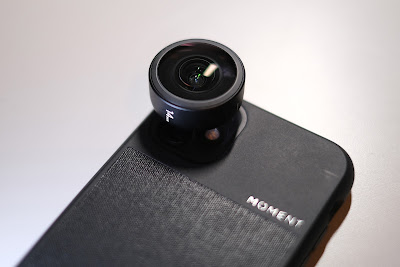
The Moment 14mm Fisheye for the iPhone 11
Image
The 14mm Fisheye is the second of the five Moment lenses I have for my iPhone11 and it is also the one I have used the most over the past two months. Fitted over the standard lens on the iPhone 11, the Moment 14mm Fisheye gives an ultra wide 170 degrees angle of view, which is a lot wider than the 120 degree offered by the wide angle lens on the iPhone.  The Moment lens is also designed to give this impressive view without any vignetting in the corners, but you do have to be careful to keep your fingers from creeping into the edge of the frame as you hold the phone to take the shot. Like all the M Mount Moment lenses the build quality of the 14mm Fisheye is superb with optical glass surrounded in an all metal chassis.  The Moment 14mm Fisheye boasts additional elements of bi-aspheric glass compared to the previous 15mm model. Also, because it fits over the standard lens on the iPhone 11, the Fisheye gives the user the option of using Night Mode, w...

iPhone Panorama

Image
Last month I decided to upgrade my trusty Samsung S5 to the new iPhone 6S plus.  In 2012 I had an iPhone 4S. While I wasn't a fan of the phone itself or the operating system, I did like the camera and the images it produced ( CLICK HERE for the feature).   Fast forward four years and I am now back to Apple for my phone.  One of the main reasons is the ability to link to my iPad and iMac and also the size of the iPhone 6S Plus makes it great for traveling with - it's almost a mini iPad. Anyway the camera is a big step up from the iPhone 4S and my Samsung S5 and I have been playing with the different settings for both stills and video.   I have found the panoramic function really useful as it is really easy to use and the results are great. Here are a selection of panoramic images taken on the iPhone 6S Plus ------------------------------------------------------------------------------------------------------------- ...

What's Your Desktop Image?

Image
Computer desktops are very personal things and everyone treats their's differently.  I suppose being a photographer makes it easier to personalise my two desktops but my dilemma is always which image do I choose.  I tend to change my desktop image once every couple of months and it is usually when I  been somewhere interesting and want something to brighten my day when I'm chained to the desk. The iMac desktop was chosen because I am on a countdown to spring and the beach isn't far away.  In fact the arrow point out of my office window is pointing the right way to Belhaven Bay just 500 metres up the road from when we live in Dunbar.  The sign is at John Muir Country Park at Belhaven Bay and is pointing the way to the beach from the car park.  Last week I had this image printed on an aluminium plate for the wall in our newly decorated guest room and is also pointing the correct way to Belhaven Bay. The PC desktop is one of the images from the recent ...

Taking My First Bite of the Apple

Image
Well I have given in!  After many years of fellow photographers telling me I needed a MAC and MACs were the best, I have finally turned to the dark side and ditched my Windows desk top PC for a shiny new 27" iMac.  So why have I decide to this now I hear you ask? Well it has a lot to do with the direction that Microsoft have gone with the Windows platform.  I like Windows 7, there is nothing wrong with Windows 7 and all of my other work is supported by Windows software (MS Office, Lightroom, Photoshop Elements etc) and I have invested a lot of money into this.  So, like buying into a camera system, changing from PC to MAC is a big step.  I had to make a decision because my 5 year old desktop PC needed to be renewed.  I had specced it to the hilt when I bought it new but age was starting to creep in and it had started to slow down. My options were to buy a new PC running Windows 7 like my laptop or go look at Apple for the first time.  The p...